Demo
Demo Project
Master Combat Core includes a fully playable rogue-like demo project showcasing how the system can be used to build complete gameplay mechanics.
The demo covers a wide range of common action-RPG features, including:
-
Player leveling
-
Action-based combat
-
Combo attacks
-
Shield blocking
-
Projectile attacks
-
Enemy AI
-
Enemy leveling
-
Skill learning
-
Enchantments
-
Buff / Debuff / Damage-Over-Time (DoT)
-
Health bars
-
Over-Time Effect (OTE) interface
-
Damage number pop-ups
-
Visual effects and sound effects
-
Deep save/load system
-
Enemy states and animations are fully preserved
-
On load, all characters continue from the exact state before saving
-
-
Loot system
-
Random enemy spawning
Demo Import
-
In the
Projectwindow, navigate to:Assets/SoftKitty/MasterCombatCore/Demo/HDRP_URP_Built-In
-
Import the demo package that matches your project’s
Render Pipeline:HDRP_Demo.packageURP_Demo.packageBuilt-In_Demo.package
Note:
Please import only one of above packages.
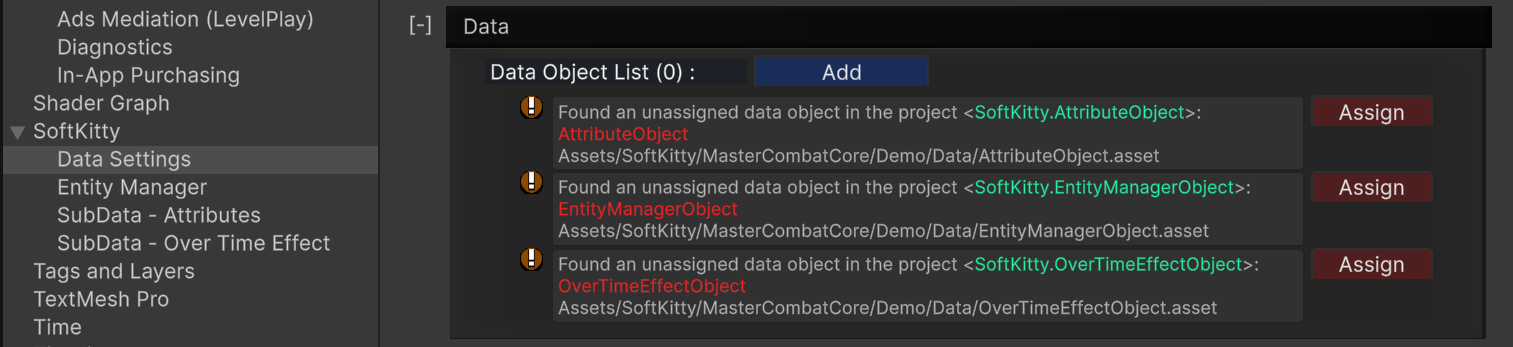
- Go to:
Project Settings > SoftKitty > Data Settingsand expand theDatasection. - Click the
Assignbuttons of all the demo database objects to add them to your project.
Interactive Tutorial
The demo also includes an interactive in-editor walkthrough that explains how these mechanics are implemented using Master Combat Core.
To access it:
-
Open the demo scene.
-
Select the GameObject named:
<<<< Demo Introduction >>> (Click Me!) -
View the walkthrough directly in the Inspector.
This guided interface explains:
-
How each mechanic works
-
Which systems and graphs are involved
-
How everything fits together in a real gameplay scenario