Installation
Different Render Pipeline
HDRP render pipeline
- Import the package.
URP render pipeline
- Import the package.
- Copy
Assets/SoftKitty/MasterCharacterCreator/URP & Built-In/URP.unitypackageto some where outside your project. - Remove everything in
Assets/SoftKitty/MasterCharacterCreatorfolder except the following folders from yourURPproject:- ArtSource
- Documentation
- Scripts
- Textures
- Import the
URP.unitypackageyou just copied.
Built-In render pipeline
- Import the package.
- Copy
Assets/SoftKitty/MasterCharacterCreator/URP & Built-In/Built-In.unitypackageto some where outside your project. - Remove everything in
Assets/SoftKitty/MasterCharacterCreatorfolder except the following folders from yourBuilt-Inproject:- ArtSource
- Documentation
- Scripts
- Textures
- Import the
Built-In.unitypackageyou just copied.
Merge Database With Other SoftKitty Packages
If you have other SoftKitty packages:
-
Import the package, uncheck
Assets/SoftKitty/Data/SGD_Settings.assetwhen importing. -
Goto
Project Settings > SubData - Character Customization, click on theAssignbutton.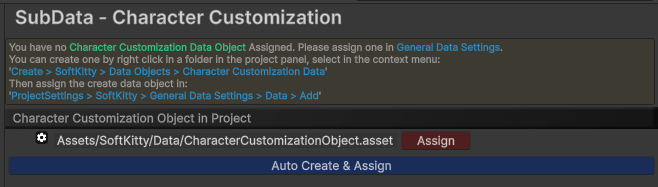
Scene List
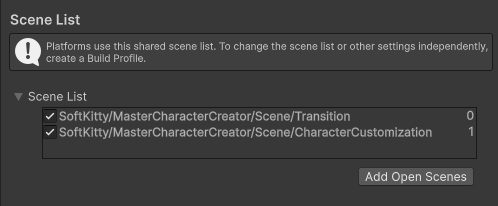
Make sure to add the following scene to your scene list in the build settings:
Demo:
-
The demo scene can be found at :
Assets/SoftKitty/MasterCharacterCreator/Demo/Scene/OutdoorsScene.unity -
To run the demo, make sure to add the following scene to your scene list in the build settings:
