Loot Pack
class SoftKitty.InventoryEngine.LootPack : MonoBehaviour
class SoftKitty.InventoryEngine.LootPackData
LootPack is a runtime loot container system responsible for generating randomized items and currency rewards.
LootPackData stores the configuration.
LootPack is the runtime MonoBehaviour instance created when a pack is spawned.
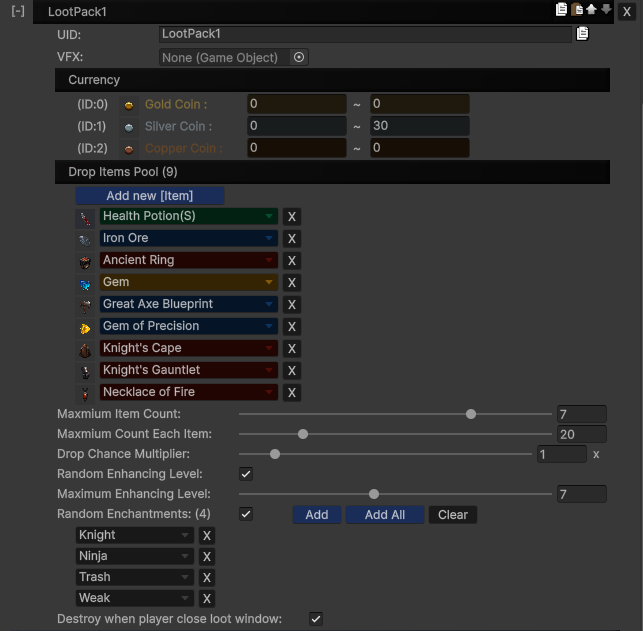
A LootPack:
-
Generates random items based on item drop rates
-
Applies DropChanceMultiplier
-
Supports random enhancement levels
-
Supports random enchantments
-
Generates currency rewards
-
Optionally destroys itself when the loot window is closed
Create LootPack
Navigate to:
Project Settings → SoftKitty → SubData - Items → Loot Pack Settings
Basic
-
UID– unique identifier -
VFX– optional prefab instantiated as child when spawned
Item Pool
-
List of item IDs
-
MaxiumItemCount– total number of items dropped -
MaxiumCountEachItem– stack limit per item -
DropChanceMultiplier– global drop rate multiplier
Enhancement
-
RandomLevel– enable random upgrade level -
MaxiumEnhancingLevel– cap for generated level
Enhancement success chance is evaluated using:
ItemObject.instance.EnhancingSuccessCurve
Enchantments
-
RandomEnchantment– enable random enchantment system -
EnchantmentPool– optional whitelist
Enchantments only apply if:
-
Item type matches
EnchantingCategoryID -
Enchanting is enabled
-
Success roll passes
Currency
CurrencyMin/CurrencyMaxdefine reward ranges per currency index
Behavior
DestoryWhenPlayerCloseLootWindow
When enabled, the LootPack auto-destroys after the loot UI closes.
Assign LootPack to Entity
Go to:
Project Settings → SoftKitty → Entity Manager
-
Select Entity
-
Expand Loot Packs
-
Add desired LootPack UID
When the entity drops loot, it initializes a LootPack using its configuration.
Drop LootPack
- Directly Drop
This will:
-
Instantiate a LootPack GameObject
-
Call Init(LootPackData)
-
Generate rewards immediately
-
Instantiate VFX (if assigned)
var _loot = ItemObject.DropLootPack(Vector3.zero, "TestLootPack01");//Drop a loot pack from loot packs list via its UID.
- Drop from Entity
This uses the LootPack assigned to that entity.
var _loot = GameManager.GetEntity("Monster01").GetModule<InventoryModule>().DropLootPack(); //Drop a random loot pack from an entity.
var _loot = GameManager.GetEntity("Monster01").GetModule<InventoryModule>().DropLootPack(1); //Drop a specified loot pack with its index number from an entity.
//or
var _loot = GameManager.GetEntityInstance("Monster01").GetModule<InventoryModule>().DropLootPack(); //Drop a loot pack from an entity instance.
var _loot = GameManager.GetEntityInstance("Monster01").GetModule<InventoryModule>().DropLootPack(2); //Drop a specified loot pack with its index number from an entity instance.
Open LootPack
OpenPack:
-
Opens Loot UI using LootUi.ShowLoot(mHolder)
-
Displays generated rewards
-
Tracks window state
var _loot = ItemObject.DropLootPack(Vector3.zero, "TestLootPack01");//Drop a loot pack from loot packs list.
//or
var _loot = GameManager.GetEntity("Monster01").GetModule<InventoryModule>().DropLootPack(); //Drop a loot pack from an entity.
//or
var _loot = GameManager.GetEntityInstance("Monster01").GetModule<InventoryModule>().DropLootPack(); //Drop a loot pack from an entity instance.

_loot.OpenPack();//Open the loot pack;
Methods (LootPack.cs)
public void Init(LootPackData _data)
Initializes the LootPack instance with LootPackData.
public void OpenPack()
Opens the Loot UI.
public void DestroyPack()
Destroys the LootPack GameObject.
Called when:
-
Loot UI closes (if enabled)
-
Manually invoked