HealthBarCanvas
class SoftKitty.MasterHealthBarSystem.HealthBarCanvas : MonoBehaviour
Description
HealthBarCanvas is the scene-level canvas controller for the health bar system.
It provides the rendering roots used by world-space health bars, floating combat text, and pooled UI objects.
Scene Requirement
HealthBarCanvas is used so the system can find the UI Canvas that should display world-space HealthBar elements.
 Your scene must contain one and only one
 HealthBarCanvas.
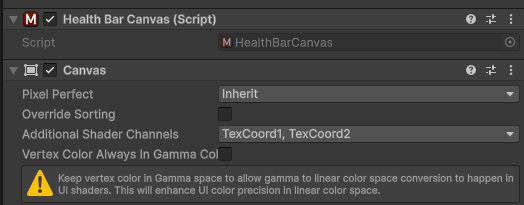
On the same GameObject, also add Unity's Canvas component.
In the Canvas component, enable TexCoord1 and TexCoord2 under Additional Shader Channels.
This allows the shader to receive runtime data through UV2 and UV3 channels and helps avoid creating multiple material instances.
Public Static Properties
HealthBarCanvas instance
Returns the active singleton instance.
If no instance exists, the system will try to find one in the scene.
If none is found, it logs an error and may auto-create one under a detected CanvasScaler.
Camera MainCamera
Returns the camera used by the system for world-to-screen conversion.
By default, it uses Camera.main unless overridden.
Vector2 ScreenSize
Returns the cached canvas size used by the UI system.
It resolves from CanvasScaler, root RectTransform, or parent RectTransform.
Core Method
void SetMainCamera(Camera _camera)
Overrides the default camera used for 3D view calculations.
Call this when your project does not use the standard MainCamera tag or when you need a custom rendering camera.
Runtime Behavior
- On
Awake(), duplicateHealthBarCanvasinstances are detected and removed. - On
Awake(), the manager is initialized automatically throughHealthBarManager.Init(). - Child roots such as
HealthBarRoot,FloatingBarRoot, andPoolRootare created lazily when first accessed.
Usage Notes
- Place
HealthBarCanvasunder your main UI canvas. - Use a full-screen
RectTransformlayout. - If bars do not render, first verify that the scene contains exactly one
HealthBarCanvasand that the attachedCanvashasTexCoord1andTexCoord2enabled.