Overview
Health Bar Settings Overview
The Health Bar System project settings panel is the authoring center for all runtime bar behavior.
You can define reusable presets and apply them to different character types through UIDs.
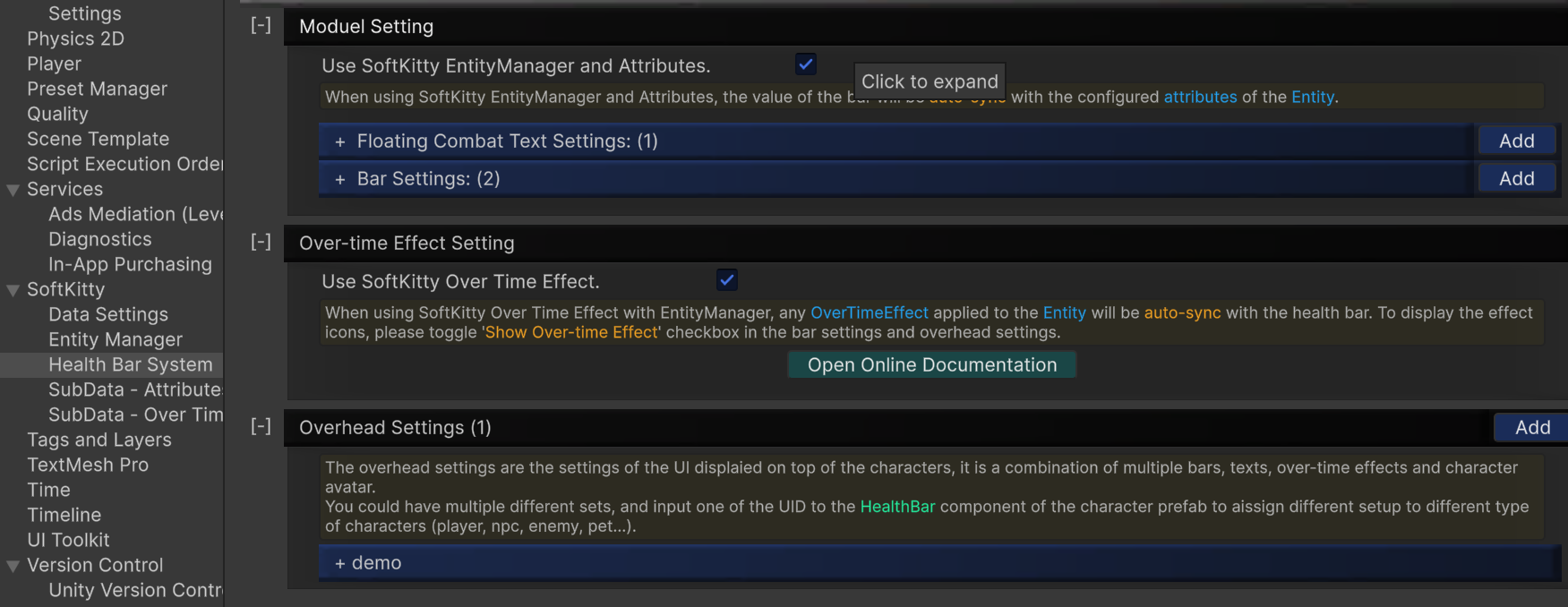
Setting Groups
Module Setting
Global runtime toggles, including:
Use SoftKitty EntityManager and Attributes- When enabled, the value of the bar will be auto-synced with the configured attributes of the Entity.
- Tooltip: Whether your project is using SoftKitty EntityManager and Attributes.
- When disabled, you need to manually update bar values via
HealthBar.SetValue(int _barIdx, BarValueType _type, int _value).
Floating Combat Text Settings
Defines reusable floating text styles used for damage/heal feedback.
- Section tooltip: Attributes of this entity.
Add: Create a new floating combat text.
Bar Settings
Defines visual style and value mapping for each bar profile (Classical / Ball / Segment).
- Section tooltip: Attributes of this entity.
Add: Create a new bar setting.
Over-time Effect Setting
Controls whether Over-time Effect data syncs from SoftKitty systems.
Use SoftKitty Over Time Effect- When enabled, any
OverTimeEffectapplied to the Entity will be auto-synced with the health bar. Tooltip: Toggle SoftKitty Over Time Effect system with EntityManager. To display effect icons, enableShow Over-time Effectin both bar settings and overhead settings. This feature is unavailable whenUse SoftKitty EntityManager and Attributesis disabled inModule Setting. To display the effect icons, please toggle 'Show Over-time Effect' checkbox in the bar settings and overhead settings.
- When enabled, any
Overhead Settings
Builds full overhead UI compositions (main bar, sub bars, avatar, info text, OTE anchor, distance scaling).
The overhead settings are the settings of the UI displayed on top of the characters. It is a combination of multiple bars, texts, over-time effects, and character avatar.
You can have multiple different sets, then input one UID into the HealthBar component of the character prefab to assign different setups to different character types (player, NPC, enemy, pet, etc.).
You can assign one UID to the HealthBar component of a character prefab to use different setups for different character types (player, NPC, enemy, pet, etc.).
UID-Based Workflow
- Create presets in settings.
- Give each preset a stable UID.
- Reference those UIDs from runtime components.
This makes it easy to reuse the same setup for many entities while keeping configuration centralized.