Damage Over Time (DoT)
This guide walks you through creating your first Damage-over-Time (DoT) effect using Master Combat Core.
Prerequisites
Before starting, make sure:
- You already have a
player character. - An EntityComponent has been added to the player prefab (from the previous guide)
- Core Attributes have been set up (e.g. hp)
Step 1 — Create the DoT Graph
- Right-click in the Project Window and create a new GraphObject:
Create > Soft Kitty > Node Graph Object
- Double-click the asset to open it in the Graph Editor
- Create two Variable Nodes and set their type to Dynamic Variables.
- Configure them as follows:
UID Default Value damage 1 Layer 1 - Add a Math Node → Multiply.
- Connect both
DynamicVariable Nodes to the input ports of theMultiplyMath Node.
Step 2 — Configure Always-On Execution
-
Remove the Trigger Node and Condition Node.
DoT graphs are executed continuously by the Over-Time Effect system and do not require triggers.
-
Create a
TargetEntity Node and connect it to theEntityinput of anAttributeChangeAction Node. -
Connect the
MultiplyMath Node output to the Value input of theAttributeChangeAction Node. -
Configure the Action Node:
- Attribute UID: hp
- Operation: Subtract
Your graph should now look like this:
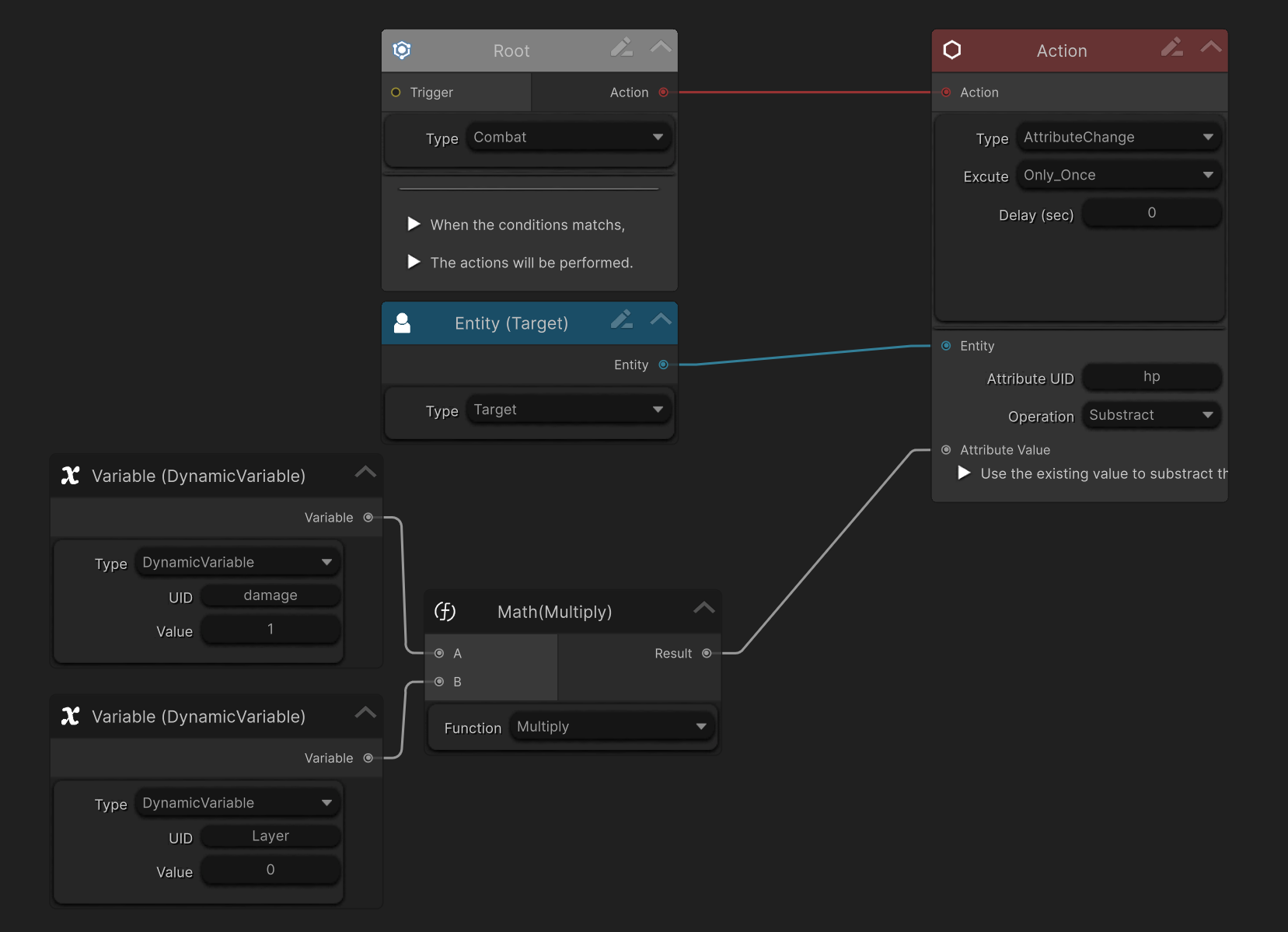
Step 3 — Create the Over Time Effect (OTE)
- Go to:
Project Settings > SoftKitty > SubData - Over Time Effect
- Click
Add New OverTimeEffect. - Fill in basic information such as:
Display NameCategoryDuration
- Set:
- UID: poison
- Design Graph: drag in the DoT Graph you just created
- Click
Read From Design Graph.The system will detect and list all Dynamic Variables.
- Adjust values:
- Set
damageto any number you want Layeris locked (system-managed)
- Set
- Enable:
Can Be RefreshedLayered- Set
Maximum Layerto 99
Step 4 — Apply the DoT via Code
You can now apply the DoT to an entity using code:
GameManager.GetPlayer().AddOverTimeEffect("poison", null);
During runtime:
- Monitor the EntityComponent Inspector.
- Repeatedly apply the DoT
- Observe that:
- The effect stacks
- Damage scales with the number of layers
- The player’s hp decreases accordingly
Step 5 — Apply DoT from a Damage Graph (On Hit)
You can also apply a DoT from another Graph.
- Open the
Damage Graphcreated in the previous guide. - Add a new Action Node.
- Change its type to
OverTimeEffect. - Set:
Effect IDto the integer ID ofpoison- Connect the
TargetEntity Node to this Action Node
Now, when the damage graph executes:
- Damage is applied
- Poison is added to the target on hit
Result
You now have:
- A fully functional Damage-over-Time system
- Layered and refreshable effects
- Graph-driven damage logic
- Reusable DoT behavior across skills, weapons, and enemies
Notes & Best Practices
-
Dynamic Variables allow design-time tuning without code changes
-
Layering enables powerful effects like poison, burn, bleed, or corrosion
-
The same DoT graph can be reused across multiple effects