Customize Emotions
Master Character Creator allows you to create and customize unique character emotions, which can then be triggered in your game using their unique identifier (UID).
-
Locate the Character Customization Settings in :
Project Settings/SoftKitty/SubData - Character Customizationand expand theCharacter EmotionSettings section.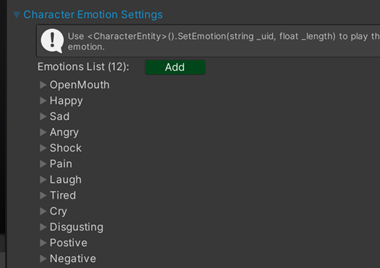
-
Expand an emotion entry in the list. You will see a field labeled
UID. This string is the unique key you'll use to play this specific emotion in your game.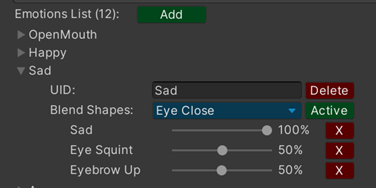
-
To trigger an emotion in your scripts, call the function
<CharacterEntity>().SetEmotion(string _uid, float _length), replacing _uid with theUIDof the desired emotion and_lengthwith theduration(in seconds) you want the emotion to play. -
The
blend shapesdropdown allows you to activate multiple facialblend shapeson your character's head simultaneously. Use the percentage sliders next to eachblend shapeto control the intensity and create nuanced emotional expressions.