Implementing Lip Sync
IMPLEMENTING LIP SYNC SYSTEM
MCC is compatible with most LipSync system using BlendShapes, such as SALSA LipSync Suite. Follow the below steps to implement LipSync system:
-
Find
CharacterMaleandCharacterFemaleprefabs in:Assets\SoftKitty\MasterCharacterCreator\Resources\MasterCharacterCreator\Player\ -
Uncheck
Manage Blend Shapessetting in theCharacterBoneControlcomponent. -
Find
Model_HeadGameObject under each prefab, add yourLipSynccomponent to it. -
Assign the following
BlendShapesofModel_Headas visemes of yourLipSyncsystem: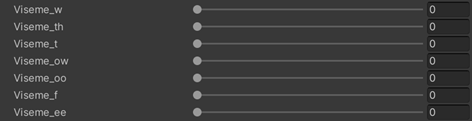
-
Find
Model_TeethGameObject, make sure includeTeeth_OpenBlendShapewith yourLipSyncsystem as well.