Fog of War
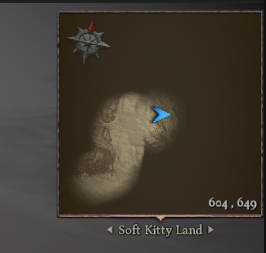
The Fog of War system allows you to dynamically reveal or hide areas of your map, commonly used in RPG, RTS, and exploration-based games.
It is fully integrated with the Map Navigation system and optimized for performance using GPU rendering.
Requirements
The Fog of War system only works in Static Map mode.
Static Map = pre-rendered map texture generated via the Map Generator tool.
If you are using Dynamic Map Mode for realtime map rendering, Fog of War will not function.
Setup
In the Scene | Map settings (see screenshot), you can configure:
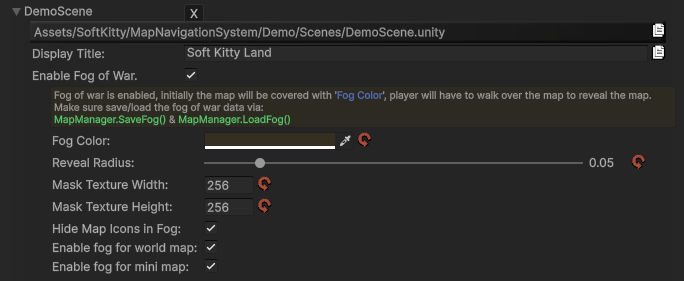
Fog Color Controls the visual appearance of the fog. The alpha channel determines the transparency:
Alpha= 1 → fully opaque (completely hidden)Alpha= 0 → fully transparent (invisible fog)
Basic Usage
Fog of War works by masking parts of the map texture.
- Areas covered by fog → hidden
- Areas revealed → visible
You can control this either:
- automatically (via
MMNlogic) - manually (via API)
API Reference
Fog of War can be fully controlled via MapManager.
Save / Load
public static string SaveFog()
Convert the current Fog of War state into a JSON string.
public static void LoadFog(string _json)
Restore Fog of War from a previously saved JSON string.
Example:
string data = MapManager.SaveFog();
MapManager.LoadFog(data);
Modify Fog
public static void AddFog(Vector3 _worldPos, float _radius)
Add fog at a world position.
_worldPos→ world space position_radius→ normalized (0 ~ 1), relative to map size
public static void RemoveFog(Vector3 _worldPos, float _radius)
Reveal an area (remove fog).
_worldPos→ world space position_radius→ normalized (0 ~ 1), relative to map size
Example:
// Reveal area around player
MapManager.RemoveFog(player.transform.position, 0.05f);
Global Control
public static void ClearFog()
Reveal the entire map.
public static void FillFog()
Cover the entire map with fog.
Example:
// Reveal the entire map
MapManager.ClearFog();
Performance Notes
Fog of Waris implemented using GPU rendering (RenderTexture)- Avoid frequent full updates (e.g. calling
FillFog()every frame) - Incremental updates (
AddFog/RemoveFog) are very cheap